
SDR on Pentoo (on Proxmox)
Or how to set up an SDR basestation
I’ve been meaning to put my SDR into more practice, and wanted to set this up as a static point off my homelab that I can call back to whilst I travel. This should let me play round with it more often without having to carry the (let’s be honest, suspicious-looking) hardware through airports and so on.
The approach
Given my requirement, I wanted to set up a Pentoo VM on my Proxmox setup, with my hardware connected and suitably isolated from the EM transmissions. Setting this up on my Proxmox server also requires USB passthrough. If signal passthrough becomes an issue, I’ll move across to dedicated hardware, but for my purposes I expect this approach will be sufficient.
Using Pentoo is generally seen to be doing it ‘the hard way’, but I wanted to get more experience with the distro. Besides, I’m confident Michael Ossmann knows more about this than I do, and he recommends it.
Note: Maybe it’s my limited use-cases, but I’ve yet to hit anything that I couldn’t have done through Ubuntu much, much, much more easily than getting to grips with Pentoo. Caveat emptor.
Download and install Pentoo
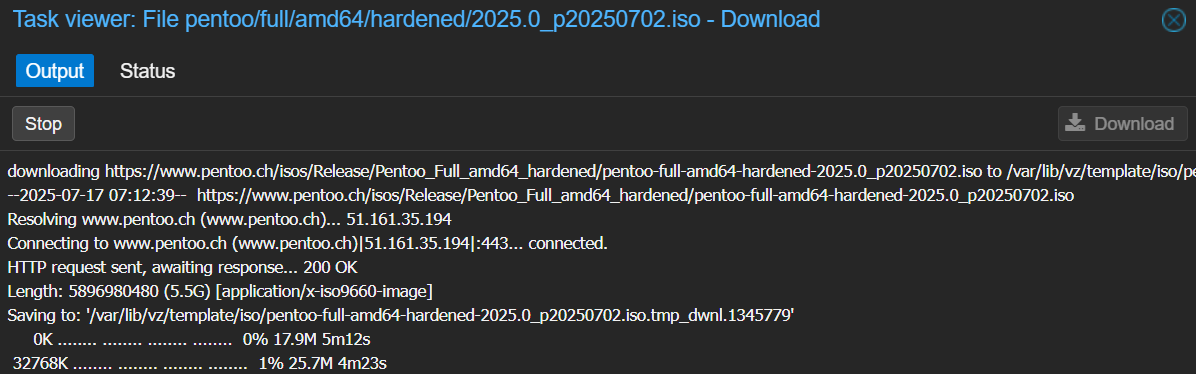
Download the ‘Full’ Pentoo .iso as normal to your Proxmox server (www.pentoo.ch/isos).
Once installed, boot into the instance. This will by default be the Live instance. The next step is to upgrade the instance to full.
I had some issues getting used to Gentoo specifics
- Start NetworkManager (!)
sudo /etc/init.d/NetworkManager start
- Set Network Manager to start from boot:
sudo rc-update add NetworkManager default- Upgrade Pentoo from Live via
pentoo-installer.
sudo emerge --ask pentoo-installer
sudo pentoo-installer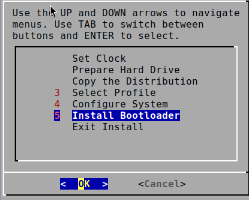
-
Follow the installer to the final stage, when it will enter a loop and not allow you to set up a GRUB2 bootloader. This is a known issue; the workaround is to choose
Noneand exit the install without a bootloader set. -
DO NOT reboot the system, as we still need a bootloader. We’re going to install one after binding our new system to
/mnt/and usingchrootto change root into this new, isolated environment. Once we’re there, it’s an easy move to install grub manually onto/dev/sdawithout nuking our system.
sudo umount -R /mnt
sudo mount --bind /dev /mnt/dev
sudo mount --bind /dev/pts /mnt/dev/pts
sudo mount --bind /proc /mnt/proc
sudo mount --bind /sys /mnt/sys
sudo mount --bind /run /mnt/run
sudo chroot /mnt /bin/bash

grub-install --target=i386-pc /dev/sda grub-mkconfig -o /boot/grub/grub.cfg- Once this is installed, reboot the system. I also needed to re-start
xdmdisplay manager to bring back the GUI.
reboot

sudo /etc/init.d/xdm start
sudo rc-update add xdm default
Update and install packages
Now we have a full Pentoo instance set up, we can make sure the right packages are installed.
The below is the compiled learning of several run-throughs, and works for me on a clean install with only a little bit of complaining by emerge, but please do build on this yourself and with AI help.
# Sync and update the system
sudo emerge --sync && sudo emerge --update --deep --newuse @world && sudo emerge --depclean

# Set system profile
sudo eselect profile set default/linux/amd64/23.0/split-usr/hardened

# Update toolchain
sudo emerge --ask --oneshot sys-devel/gcc sys-libs/glibc
sudo gcc-config -c
sudo env-update && source /etc/profile

# Rebuild the system with current settings
sudo emerge --ask --emptytree @world

# Accept keywords and set USE flags for specific packages
echo -e "pentoo/pentoo-* ~amd64\napp-crypt/* ~amd64\nnet-voip/* ~amd64\nnet-misc/* ~amd64" | sudo tee /etc/portage/package.accept_keywords
echo "net-wireless/gqrx **" | sudo tee -a /etc/portage/package.accept_keywords
echo "net-wireless/gqrx gr-audio -pulseaudio -portaudio" | sudo tee -a /etc/portage/package.use

# Preview planned changes for gqrx (optional)
emerge -pv net-wireless/gqrx

# Manage config updates and read news
sudo etc-update && sudo dispatch-conf
eselect news read
Enable USB Passthrough
Enable USB passthrough for the SDR in Proxmox to our Pentoo VM (102) by using lsusb to identify the correct device, and qm set to in the correct host (by ID) to the right VM (in this case 102 is the VM identifier)

This permanently modifies the /etc/pve/qemu-server/102.conf VM configuration file, so USB passthrough persists across reboots (though we should avoid unplugging the device whilst the VM is up, and errors may occur if the device isn’t present when the VM starts)
We made it
And there we are. We have a working Pentoo instance with access to our hardware via USB passthrough. Confirm the HackRF is attached:
hackrf_infoTest that signals are being received:
hackrf_transfer -r output_file.bin -f <frequency> -s <sample_rate>As outlined at the top, I’m confident this would have been easier using Ubuntu as a distribution, but it was interesting to play with a Gentoo-based distro, and I’m looking forward to see what makes Pentoo tick.